
The Ninjirate
New member
Reported Issue:
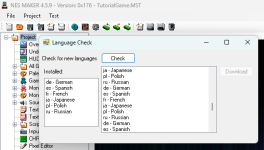
The Language Check menu does not seem to be functioning correctly in 4.5.9.
1. If a user clicks the Check button more than once, a list of available languages is appended to the list but the previous entries are not removed.
2. If a user chooses to Download one of the available language options, nothing happens. There is no visible response to the user that anything occurred and no files are changed for that language in the folders. The files still have the previous date and time stamps.
Affects Version(s):
NESMaker 4.5.9
Risk/Impact:
Low - Bad User Experience
No New Languages are currently available that are not already distributed in 4.5.9 release so the issue is considered very low actual impact at this time.
Steps To Recreate:
1. Open NESMaker and create a new or select an existing project.
2. Click Help > Check for New Languages
3. Click Check
4. Observe that the available languages are added to the list.
5. Click Check Again
6. Observe that the available languages are added to the list again but the previous entries in the list are not removed.
7. Select one of the available languages in the right window pane.
8. Click Download
9. Observe there is no visible response that occurs for the user.
10. Browse to the language folder for the language you selected in your active program folder.
11. Observe that the language dll file still has the previous date and time stamp from when the file was extracted.
Expected Results:
1. When the check button is used multiple times, the program should clear the list of available languages to download and repopulate the list.
2. If a user selects a language then clicks the download button, there should be some visible prompt to the user that something has happened and it should either redownload the language files and replace them or alert the user that language is already installed.
Actual Results:
1. When the check button is used multiple times, a large list of repeating languages are appended to the list.
2. If a user selects a language and clicks the Download button, nothing seems to occur.
The Language Check menu does not seem to be functioning correctly in 4.5.9.
1. If a user clicks the Check button more than once, a list of available languages is appended to the list but the previous entries are not removed.
2. If a user chooses to Download one of the available language options, nothing happens. There is no visible response to the user that anything occurred and no files are changed for that language in the folders. The files still have the previous date and time stamps.
Affects Version(s):
NESMaker 4.5.9
Risk/Impact:
Low - Bad User Experience
No New Languages are currently available that are not already distributed in 4.5.9 release so the issue is considered very low actual impact at this time.
Steps To Recreate:
1. Open NESMaker and create a new or select an existing project.
2. Click Help > Check for New Languages
3. Click Check
4. Observe that the available languages are added to the list.
5. Click Check Again
6. Observe that the available languages are added to the list again but the previous entries in the list are not removed.
7. Select one of the available languages in the right window pane.
8. Click Download
9. Observe there is no visible response that occurs for the user.
10. Browse to the language folder for the language you selected in your active program folder.
11. Observe that the language dll file still has the previous date and time stamp from when the file was extracted.
Expected Results:
1. When the check button is used multiple times, the program should clear the list of available languages to download and repopulate the list.
2. If a user selects a language then clicks the download button, there should be some visible prompt to the user that something has happened and it should either redownload the language files and replace them or alert the user that language is already installed.
Actual Results:
1. When the check button is used multiple times, a large list of repeating languages are appended to the list.
2. If a user selects a language and clicks the Download button, nothing seems to occur.